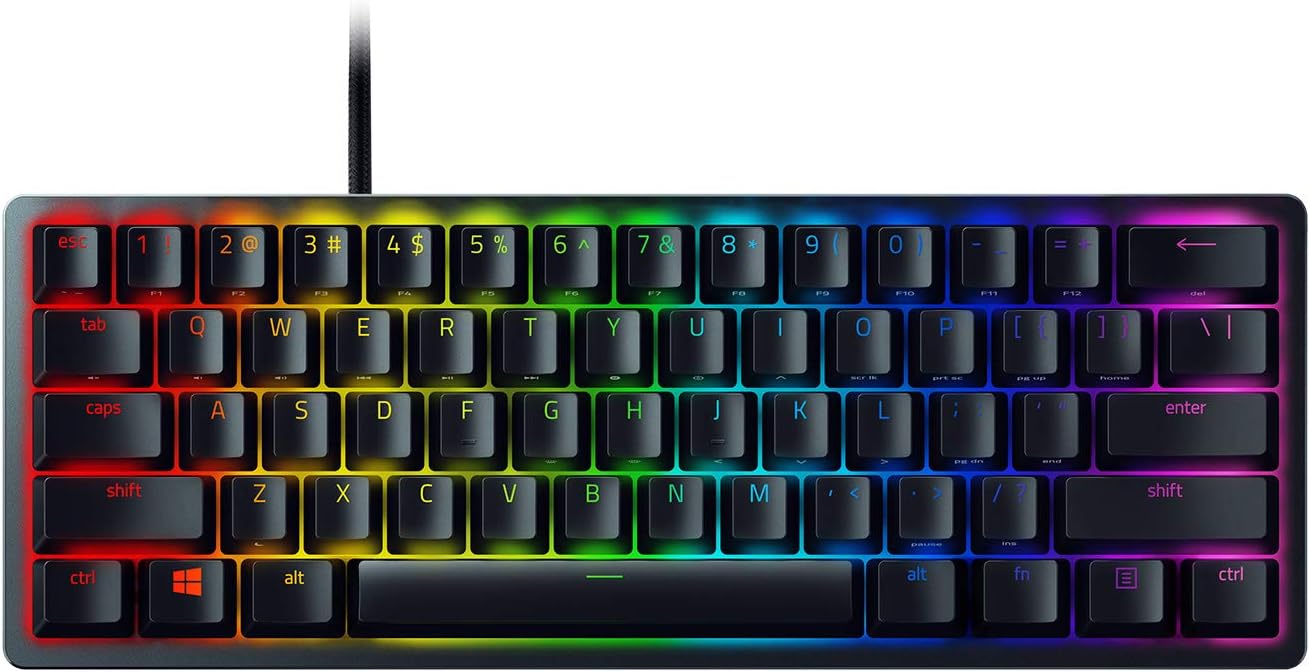
Razer Huntsman Mini

keyboards-mice · cave pick

Razer Huntsman Mini

60% optical switch board for tight desks.

~$99 on Amazon (approx.)
★ 4.6 (approx.)

Discover on Chrome Cave. Checkout, shipping, and returns on Amazon.

Signal from the cave

Review snapshot

~4.6 from Amazon ratings (approx.)

A compact 60% optical board for tight desks—fast actuation culture without borrowing half your mouse space.

What people love

  • Small footprint frees mousepad real estate
  • Optical switch marketing with snappy feel for many typists
  • Portable enough for LAN bag life
  • Clean look when you want less keyboard continent

Honest caveats

  • 60% means learning layers for arrows and functions
  • Sound profile may be sharp depending on mods and surface
  • Not everyone wants Razer ecosystem RGB software
  • Mini boards punish users who live in spreadsheets all day

Best for

  • +FPS desks that prioritize mouse space
  • +Travel and LAN players with limited bag volume
  • +Gamers who already like 60% muscle memory

Skip if

  • You need dedicated arrow keys every minute of the workday
  • You want a soft, silent office board first
  • You refuse function layers entirely

Cave notes

Huntsman Mini: more pad, fewer keys

Space is a performance part. Keyboards can give it back.

Who this is really for

Your mousepad is a runway and full-size keyboards are the terminal building in the way. Huntsman Mini is for players who already accept 60% life—or are ready to learn layers for a cleaner aim arc.

If you dual-use the desk for light typing, be honest about arrow-key habits before you commit.

What it does better

It reclaims desk. Optical switch designs aim for rapid reset and consistent feel; whether you love the specific tuning is personal, but the size win is objective.

For streaming desks, less keyboard mass also means cleaner camera framing.

Living with it

Print a layer map for a week. Put the board on a deskmat so it does not skate. If the stock sound is too icy, foam mods and better mounting are a rabbit hole—only enter if you enjoy it.

RGB is optional flavor. Turn it down if you actually care about focus.

Trade-offs we checked

Against TKL boards, you lose arrows-at-a-glance and gain mouse space. Against silent office 75%, you gain game-centric feel and lose meeting-call stealth. Mini wins for dedicated game desks.
First week

Setup tips

  • Learn the layer for arrows before your first ranked night.
  • Disable fancy RGB macros you will never use.
  • Use a deskmat so the mini board stays planted.
  • Export your key map if the software allows—reinstalls happen.

Buyer questions

FAQ

Is a 60% keyboard bad for work?

It depends how often you need arrows, F-keys, and nav clusters. Gamers adapt; heavy spreadsheet users often hate it.

Optical switches—do they matter?

They can feel snappy and consistent. They are not magic aim bots. Prefer the feel test over the brochure.

Huntsman Mini vs larger Razers?

Buy Mini for space. Buy larger layouts if you refuse layers.

Why price differs?

Approximate range; check Amazon live.

Can I make it quieter?

Somewhat, with technique and mods. It will not become a silent membrane office board.

Same lane

Also in the cave